Dynamic Documents with Quarto and purrr
Kolkata useR! Group talk
Welcome
GitHub Repo

About Me

Nithin M
Assistant Professor, Kerala Agricultural University
Doctoral Student, Economics
Indian Institute of Technology Kharagpur
Why Reproducibility Matters
- Copy–paste workflows → errors, inconsistencies
- Hard to update results across a long document
- Reproducibility = clarity + automation
- Quarto integrates text + code + results
Introduction to Quarto
- An open-source scientific and technical publishing system
- Supports R, Python, Julia
- Multiple output formats: HTML, PDF, Word, Typst, PPTX
Why purrr?
- Avoid repetitive copy–paste code
- Iterate cleanly over variables/datasets
- tidyverse integration
- fast
- type consistent
Some common purrr Functions
Functions
map()map2()pmap()imap()walk()
Usage
map(.x, .f, ...)map2(.x, .y, .f, ...)pmap(.l, .f, ...)imap(.x, .f, ...)
likemap2, but.y = names(.x)walk(.x, .f, ...)
Parameterised Reporting
- used to create different variations of a document. For example:
- Showing results for a specific geographic location.
- Running a report that covers a specific time period.
- Running a single analysis multiple times for different assumptions.
In Quarto while using R, you can define parameters in the YAML header of your document and then access those parameters within your R code chunks.
---
params:
  alpha: 0.1
  ratio: 0.1
---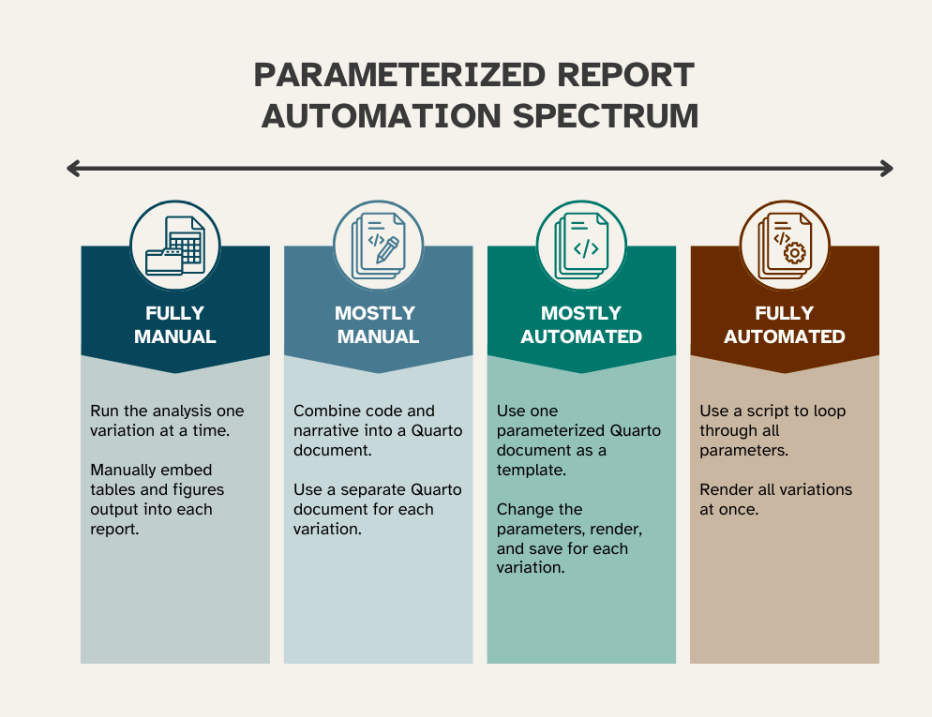
Automation Levels
How Quarto parameterized reports work
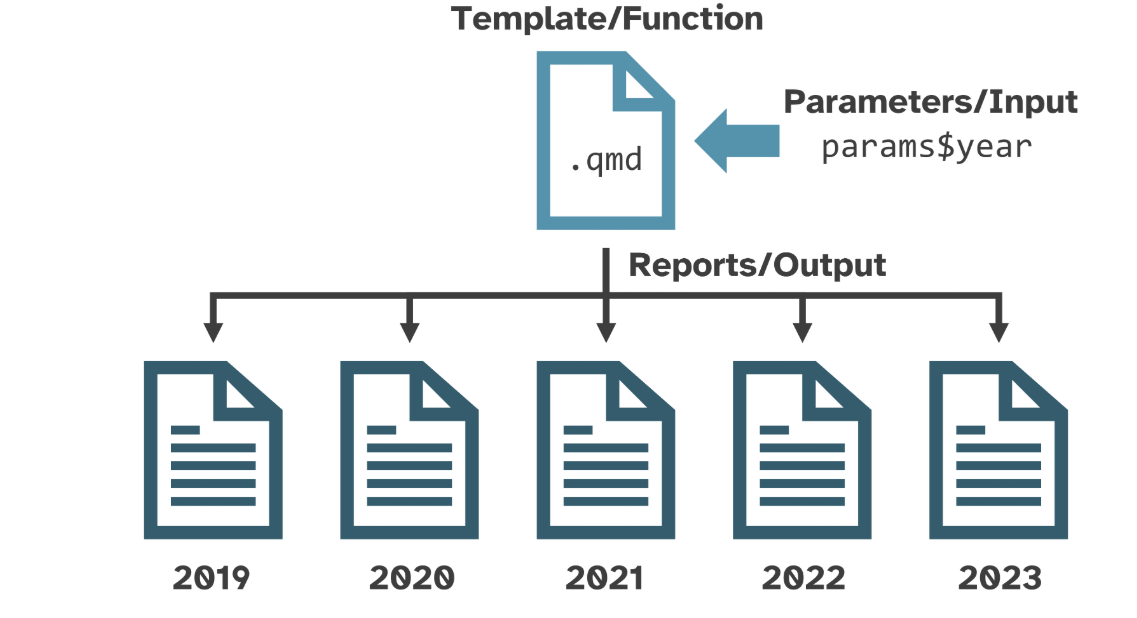
Parameterized Report in Action
How to create a parameterized report
Our roadmap
Setting and using parameters: Parameters are defined in the YAML header (Knitr) or parameters cell (Jupyter). They are accessed in the report content and code chunks.
Rendering one-at-a-time: Render reports one at a time by changing parameters manually or using command-line tools.
Rendering all at once: Automate the rendering of all report variations with a script.
Define and access parameters
Parameters are defined and accessed differently depending on whether you use the Knitr or Jupyter engine.
Rendering
- Single report with default parameters
- use “Ctrl + Shift + K” in RStudio or the “Render” button in VS Code.
- change parameters in the YAML header or parameters cell and re-render.
- Can be done without changing the original document
1. Using the command line
quarto render template.qmd -P year:2022 -P species:Adelie2. Using YAML file
create a YAML file (e.g., params.yaml) with the following content:
year: 2022
species: Adelie
Then render the document using:
quarto render template.qmd --execute-params params.yml
3. Using Quarto Render function in R
library(quarto)
quarto::quarto_render(
  input = "template.qmd",
  execute_params = list(
    year = 2022,
    producer_id = "XYZ01"
  )
)
All variations at once
use quarto_render() in R or a shell script to automate rendering all variations of your report using purrr::pmap()/purrr::pwalk().
End to End Workflow
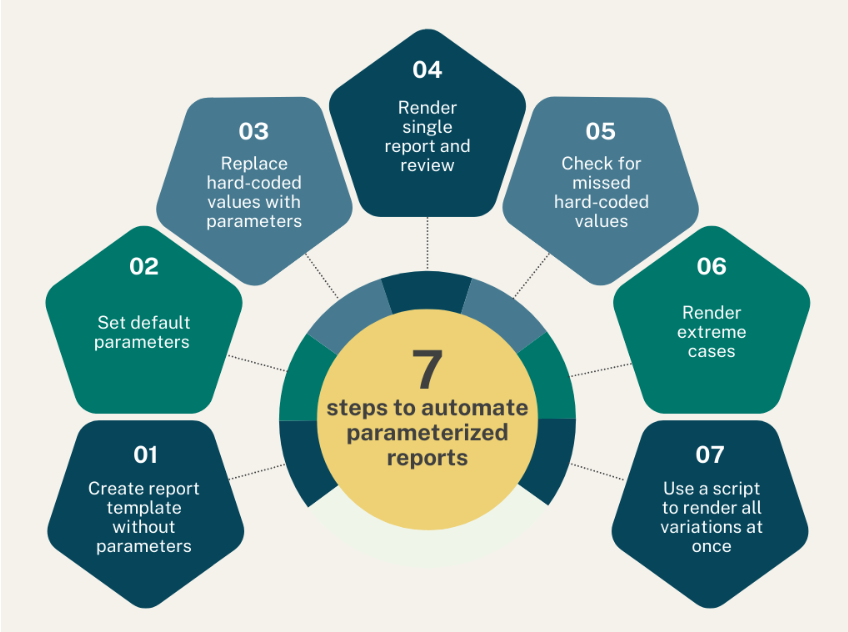
A full workflow
Parameterized reports are magic! ✨
References
Acknowledgement
- Material for this deck is adapted from Jade Ryan’s post on Quarto parameters.
- Thanks to Albert Rapp for the Typst template inspiration used in the demos.
Live Demo
Questions
Thank You! 🙏
Dynamic Documents in Quarto